For iPhone, iPad and Mac

Live translation, transcripts
and answers while you talk.

GPT Realtime Assistant is a live AI assistant for iPhone, iPad and Mac. Start a session, and it hears what is said, writes it down, and answers the question on the table before the silence gets awkward: a fact, a phrasing, the next step. Or it translates each sentence into the language you choose. Afterwards the session is a record with tasks and notes attached. Sessions start and end only when you say so.

Subscription. AI credits included. Not affiliated with OpenAI. · iOS 26 · iPadOS 26 · macOS

GPT Realtime Assistant on iPhone: the Live screen with a transcript, an assistant answer and the credit balance.
  • Real-time voice over OpenAI's Realtime API
  • Seventeen session templates, from interview to standup
  • Live translation into the language you choose
  • Karaoke-style readback with word highlighting
  • Projects, sessions, tasks, scheduler
  • Offline Whisper and Qwen models on Mac

What it does

Live, then a record.

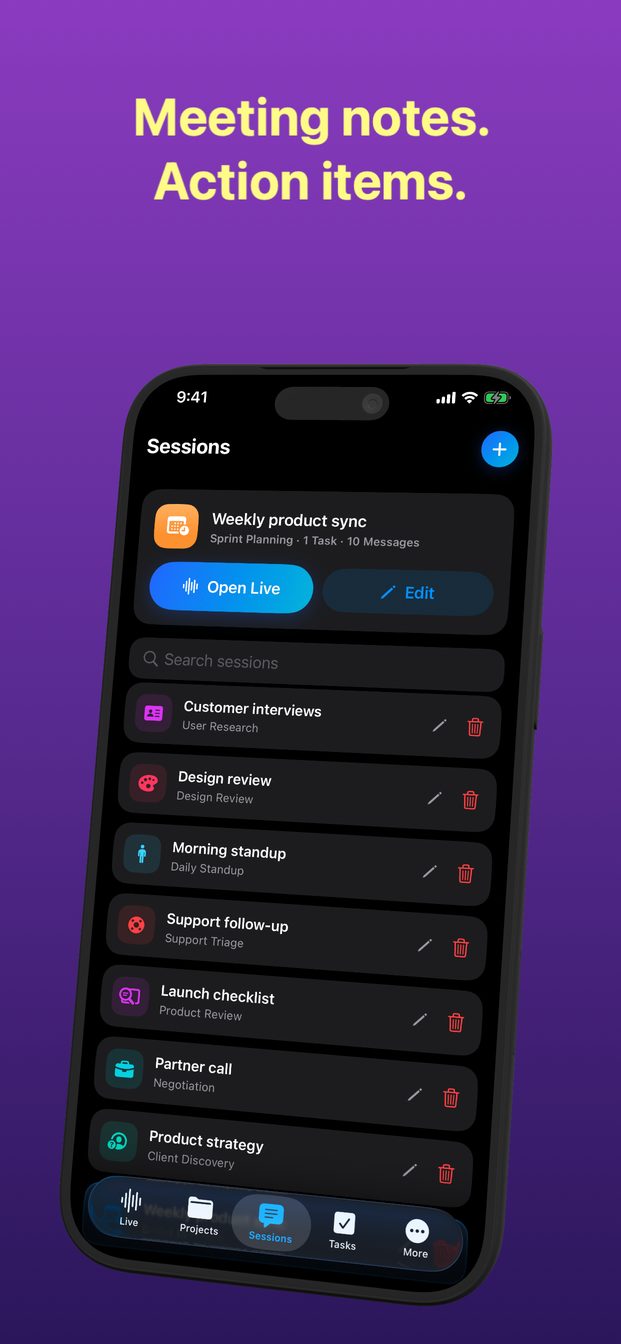
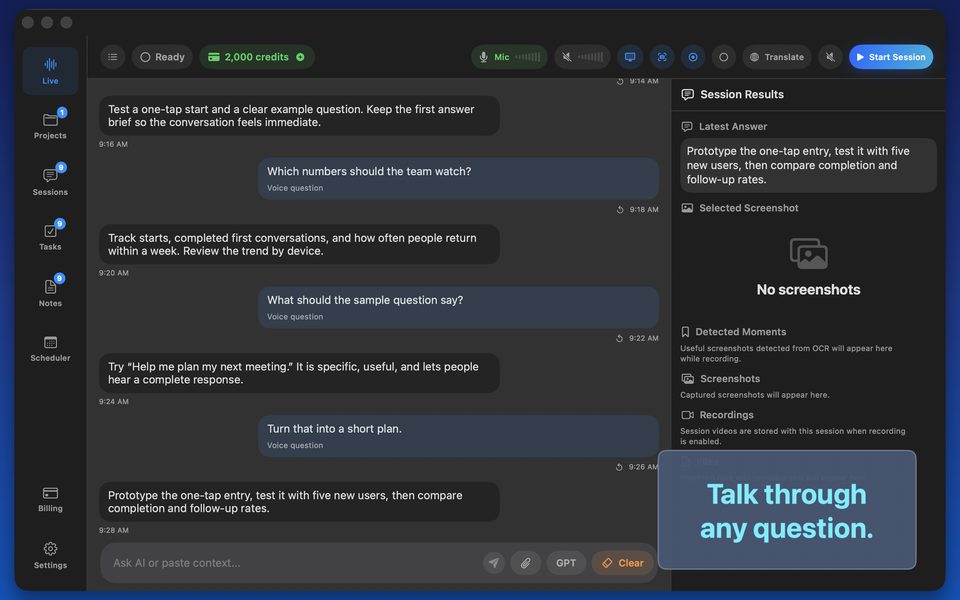
Five tabs: Live, Projects, Sessions, Tasks and Scheduler, with Notes on Mac. On iPhone, Scheduler is under More. The Live tab is where the conversation happens; the rest is what it leaves behind.

A live session, not a chat box

A live session, not a chat box

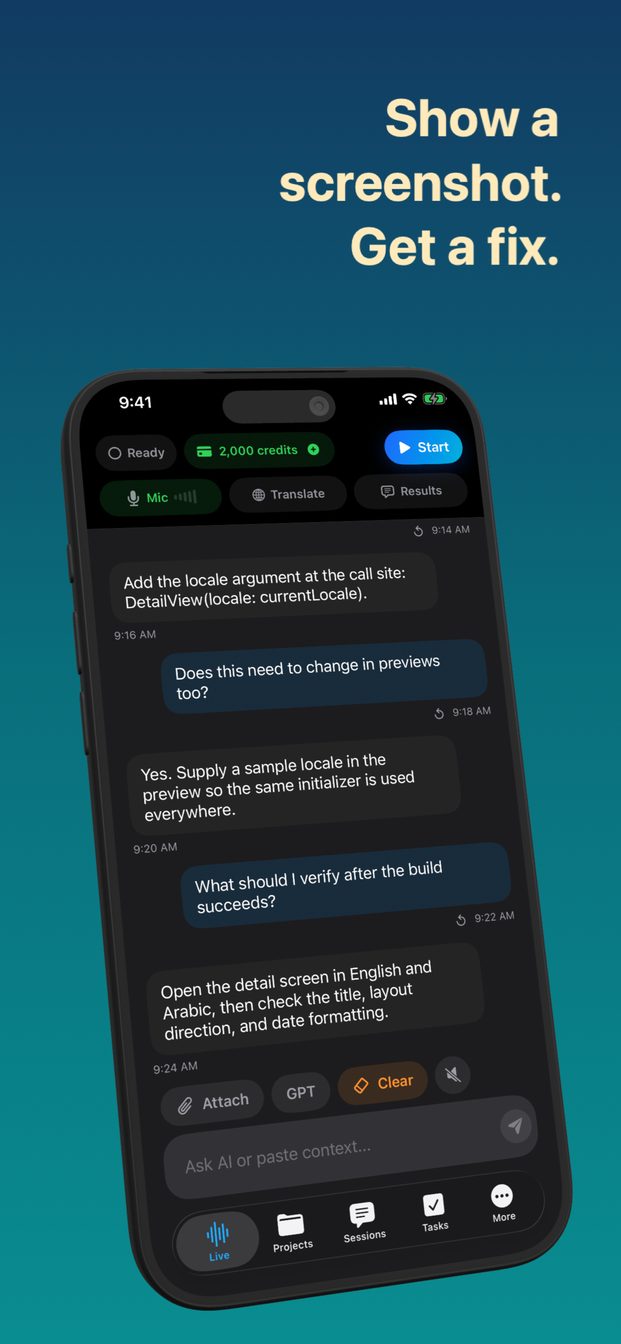
Tap Start and the microphone streams to the model. What is said appears as a transcript; what the assistant has to say appears beside it. Semantic voice detection knows when a speaker has finished, and you can interrupt the answer by talking. Answers come in brief, balanced or detailed length.

  • OpenAI Realtime API, gpt-realtime-2
  • Transcript and answers side by side
  • Interrupt by speaking
  • Brief, balanced or detailed answers
Templates for the room you are in

Templates for the room you are in

A new session starts from one of seventeen templates, each with roles and instructions already written: interview, negotiation, sprint planning, daily standup, client discovery, sales demo, support triage, incident review, design review, user research, lecture notes, one-on-one, hiring debrief, decision meeting, translation, coding task and product review. Or start a blank session and write the role and instructions yourself; either way, you can edit them for the session in front of you.

  • Seventeen templates with roles and prompts
  • Blank sessions with your own instructions
  • Projects hold sessions; sessions hold history
Translation and readback

Translation and readback

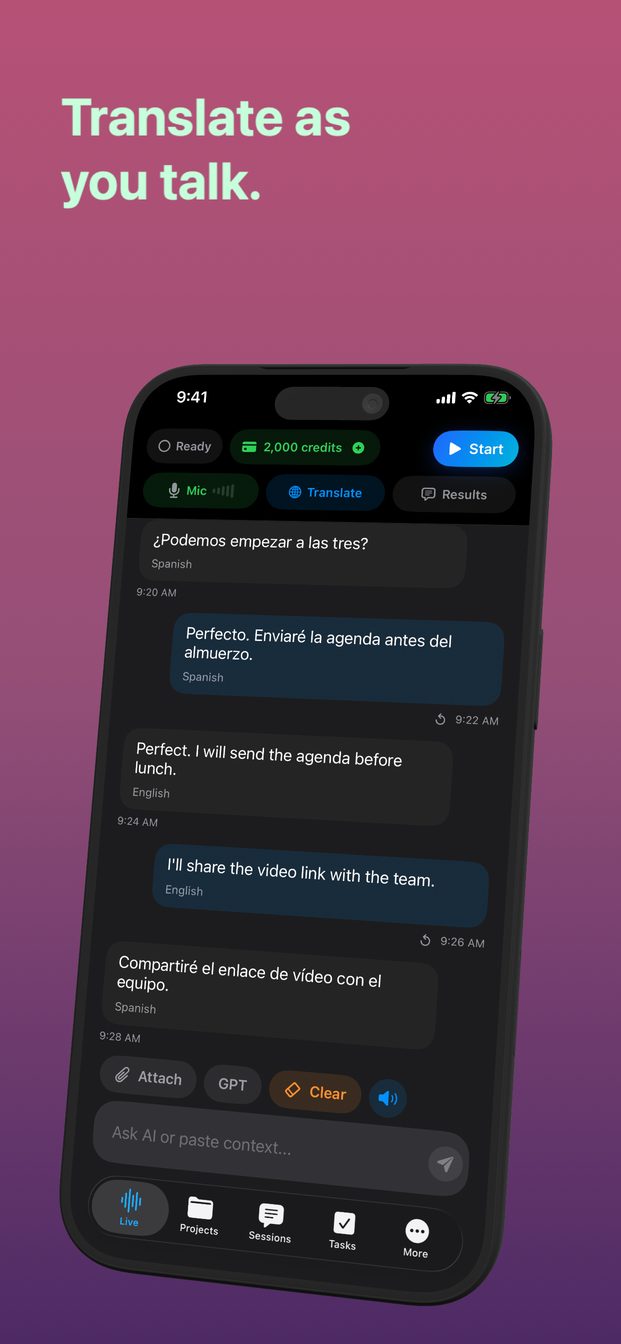
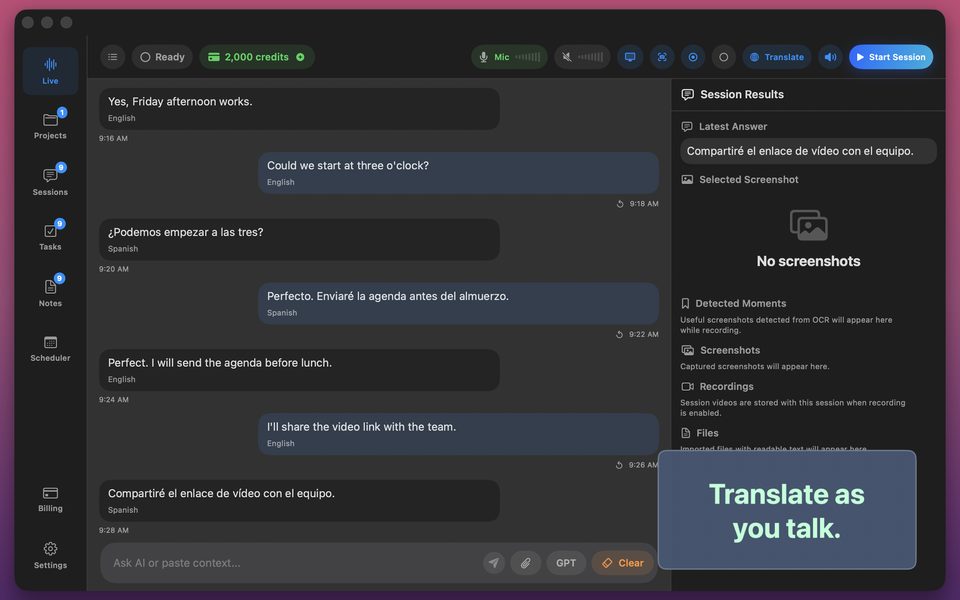
A translation session turns the assistant into a live interpreter: whatever is said, in a language it detects or one you set, appears translated into the language you choose, sentence by sentence. To answer in the other person's language, open Translate and exchange the From and To languages. Karaoke readback uses Apple's on-device speech recognition to highlight words as you read them, for rehearsing a talk or practising a language.

  • Speech detected, translated into your language
  • On-device readback highlighting
  • Highlight colour of your choice
Context you attach

Context you attach

Add a photo or a screenshot to a session and the assistant answers with it in view. On Mac the app can capture a chosen screen or window, record the session, and watch system audio, so a screen-shared meeting is context too.

  • Photo, camera and screenshot attachments
  • Screen and window capture on Mac
  • System audio on Mac
Tasks, notes, scheduler

Tasks, notes, scheduler

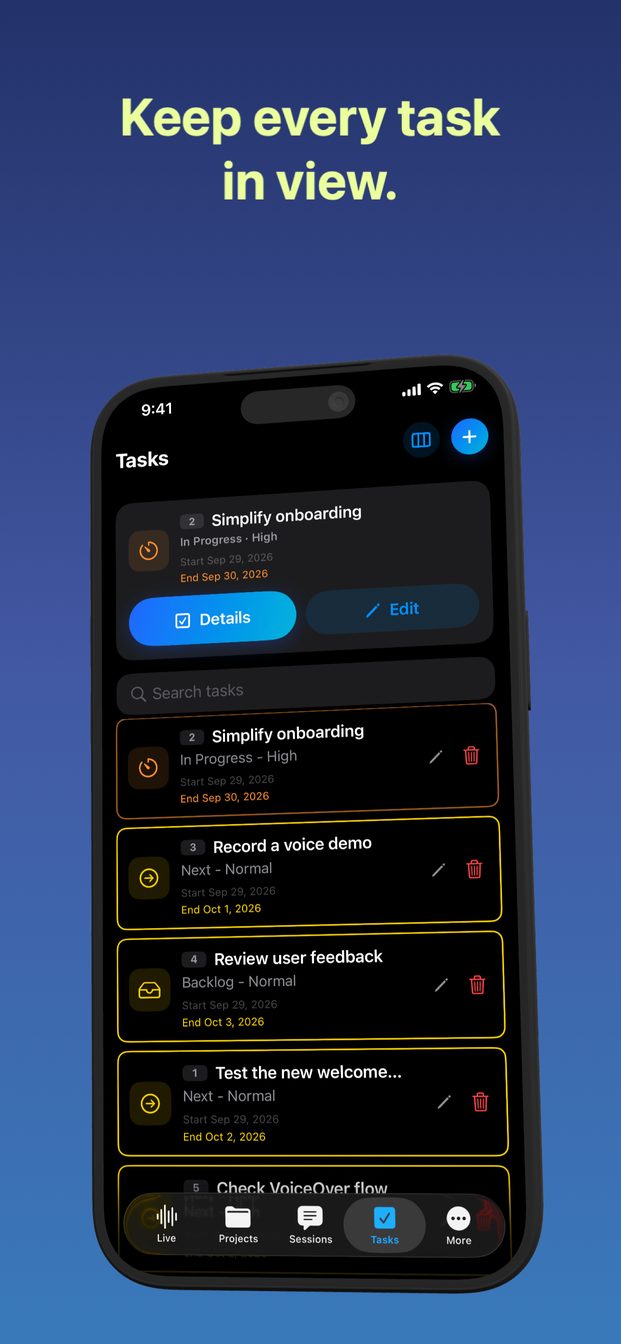
Useful moments become tasks with status, priority, dates and comments, and evidence attached as screenshots or video. Sessions can be scheduled with reminders. Notes live alongside on Mac. All of it is stored on the device.

  • Task board with evidence
  • Scheduler with reminders
  • Notes on Mac
  • Stored locally
Local models on Mac

Local models on Mac

On an Apple silicon Mac the app can download Whisper Large v3 Turbo for transcription and Qwen 3 8B for answers and run them on the machine, for sessions whose audio should not leave the room. Local sessions work without the cloud and use no credits; their answers appear as text. On iPhone and iPad, transcription is either OpenAI's or Apple's on-device speech recognition.

  • Whisper and Qwen, downloaded once, run locally
  • Mac with Apple silicon only
  • Apple Speech on every device

Who it is for

For people who are expected to have the answer during the call.

Engineers and consultants
The technical question you half remember, answered while the other person is still finishing the sentence.
Managers
Standups, one-on-ones, hiring debriefs: a transcript, the decisions, the tasks, without a notetaker.
Learners and speakers
A lecture transcribed, a language interpreted live, a talk rehearsed with the words lighting up as you say them.
Not for
Rooms where assistance or recording is not allowed. You are responsible for permission from the people you are talking to.

What it costs

One subscription, credits included.

The app needs an active monthly subscription to run. Each month includes 2,000 AI credits; a thousand credits are one US dollar of model usage at OpenAI's list rates, metered by the audio and text the session actually uses. When credits run low, packs of 1,000 or 5,000 add more without changing the subscription.

Download

$0 free to install

  • iPhone, iPad and Mac
  • One account for all three
  • Restore purchases on any device

The app needs an active subscription to run.

Monthly

$9.99 per month

  • Full app on every device
  • 2,000 AI credits each month
  • All templates, translation, readback
  • Tasks, scheduler, notes
  • Local models on Mac

Renews monthly. Cancel anytime in your Apple account.

1,000 credits

$4.99 one time

  • About one US dollar of model usage
  • Never expires with the subscription active

A consumable pack, added to your balance.

5,000 credits

$19.99 one time

  • About five US dollars of model usage
  • Never expires with the subscription active

A consumable pack, added to your balance.

Credits are spent on what the session uses: audio in and out costs more than text, cached context costs less. A session reserves a small amount to start and refunds what it did not use when it ends.

Pricing →

Questions

Asked often enough to write down.

Is this made by OpenAI?

No. GPT Realtime Assistant is made by Arte Soft and uses OpenAI's Realtime API as its model provider. It is not affiliated with, sponsored by or endorsed by OpenAI.

Do I need my own API key?

No. The subscription covers model usage through the app's own backend, which issues a short-lived session secret so your device can talk to the model directly. There is nothing to configure.

Where does my audio go?

During a session, from your device straight to OpenAI's Realtime API, under OpenAI's API data policies. Our backend never receives the audio. It records usage, purchases, credits and the session's title so it can bill and reserve credits; it stores no transcripts and no audio.

What happens to the transcript?

It stays on your device with the session. There is no cloud sync; sessions on your Mac are not on your iPhone.

How far do 2,000 credits go?

It depends on how much of the session is speech: audio costs more than text, and brief answers cost less than detailed ones. The balance is on screen during every session, so a few sessions tell you more than any estimate. Local sessions on a Mac use no credits.

Can it work offline?

On an Apple silicon Mac, with the local Whisper and Qwen models downloaded, transcription and answers can run without the cloud, and use no credits. On iPhone and iPad, sessions need a connection; only Apple's speech recognition runs on the device.

Is the assistant always right?

No. Answers can be incomplete, wrong, late or beside the point. Treat them as a prompt to think, not as advice, and check anything that matters.

Can I record other people?

Only with their permission and where it is allowed. Recording and assistance rules differ by workplace, school, jurisdiction and interview; you are responsible for following them.

Start the next session with backup.

On the App Store for iPhone, iPad and Mac. Subscribe, pick a template, press Start.

Download on theApp Store